Showing posts with label NSX-V. Show all posts
, , ,

unlock NSX local accounts for API Operations (KB#00100)

Hello Guys,

This issue is mysterious issue where NSX's local account gets locked out not for login into NSX GUI but for API operations. Creating this blog because I couldn't find the solution on web. VMware article was there explaining root cause but solution was not there too.

Symptoms

1) Any application or product which works with or uses NSX for network services, will not be able to use NSX to create, remove, update or deletion operations. However, running services will be running fine.
2) You will be able to login NSX portal but will not be able to use APIs. Not even through any other API tool like postman. You might get error like below
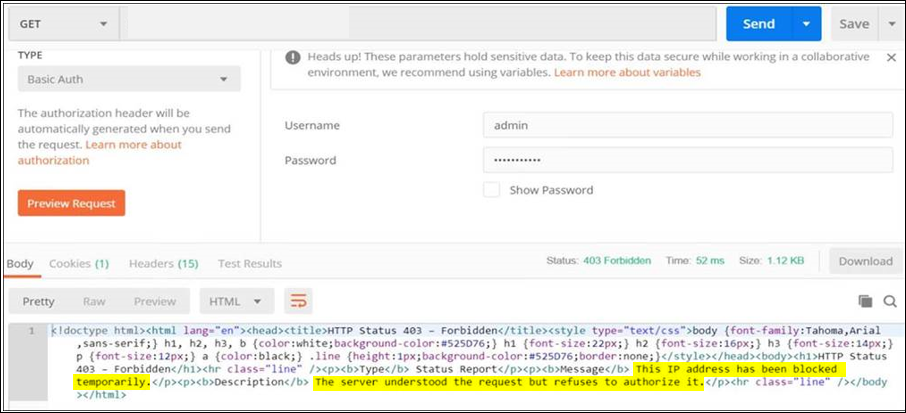

3) I uses VMware Cloud Director which uses NSX for networking and security service. On VMware Cloud Director, I could see error like below when you open any Edge Gateway or do any configuration change. Below are the VCD debug logs-

2021-07-12 16:18:52,955 | DEBUG    | task-service-activity-pool-128 | NetworkSecurityErrorHandler    | Response error: <!doctype html><html lang="en"><head><title>HTTP Status 403 – Forbidden</title><style type="text/css">body {font-family:Tahoma,Arial,sans-serif;} h1, h2, h3, b {color:white;background-color:#525D76;} h1 {font-size:22px;} h2 {font-size:16px;} h3 {font-size:14px;} p {font-size:12px;} a {color:black;} .line {height:1px;background-color:#525D76;border:none;}</style></head><body><h1>HTTP Status 403 – Forbidden</h1><hr class="line" /><p><b>Type</b> Status Report</p><p><b>Message</b> This IP address has been blocked temporarily.</p><p><b>Description</b> The server understood the request but refuses to authorize it.</p><hr class="line" /></body></html> | requestId=18cbd3bc-2eaf-42af-b11e-4bce957bff9e,request=POST https://testvcd.com/api/admin/edgeGateway/509ed27c-724d-490b-b0c7-e25d19523017/action/redeploy,requestTime=1626106731682,remoteAddress=172.25.1.21:60592,userAgent=Mozilla/5.0 (Windows NT 6.3; Win64; x64) AppleWebKit/537.36 (...,accept=application/*+json;version 34.0 vcd=632554b9-0779-4ddc-8b62-be08d1c167f6,task=82c8a4fc-35ba-490a-a235-b4a65a25cace activity=(com.vmware.vcloud.backendbase.management.system.TaskActivity,urn:uuid:82c8a4fc-35ba-490a-a235-b4a65a25cace)

4) I checked the NSX Manager logs and could see multiple events like below in /usr/appmgmt-webserver/logs/localhost_access_log.2021-07-13.txt. 

Where localhost_access_log.2021-07-13.txt. This filename will change as per current date in logs.

172.25.1.239 - - [13/Jul/2021:23:21:38 +0200] "GET /api/2.0/services/ipset/ipset-29 HTTP/1.1" "https-jsse-nio-443-exec-2292" 403 649 2234
172.25.1.239 - - [13/Jul/2021:23:21:38 +0200] "GET /api/2.0/services/ipset/ipset-106 HTTP/1.1" "https-jsse-nio-443-exec-2334" 403 649 2241
172.25.1.239 - - [13/Jul/2021:23:21:38 +0200] "GET /api/versions HTTP/1.1" "https-jsse-nio-443-exec-2366" 403 649 2243
172.25.1.239 - - [13/Jul/2021:23:21:38 +0200] "GET /api/versions HTTP/1.1" "https-jsse-nio-443-exec-2325" 403 649 2224

Yellow -  This is IP address which is trying to make a connection with NSX Manager which is failing

Red - This is error code 403 which means access forbidden

Above logs means, IP address (172.25.1.239) is trying connect with NSX Manager but NSX Manager is not allowing access to connect.

Root Cause

When any application (Monitoring or non-monitoring) is configured with incorrect username and password to connect with NSX Manager then as a security feature NSX Manager blacklist that username after certain invalid authentication attempts (by default it is 10 but can be modified). Any user too can do this because someone might be trying to guess the password! be aware of that too ;)

Solution

Before correcting it, you must identify which application or user is doing this. Because if post correction, if still invalid attempts are coming then it will again block the user account. How will you identify that's your headache but you can reach me out :)

Once identified then follow below steps

1. Login NSX Manager CLI with admin

2. enter into enable mode with commad

#enable

3. Enter into engineering mode with command↓

#st en

Press Y when asked and use password :  IAmOnThePhoneWithTechSupport

4. then edit /home/secureall/secureall/sem/WEB-INF/spring/vsmconfig.properties and look for values as below in this file

#Denotes whether blacklisting is enabled
blacklist.enabed=true

You will find it true. 

5. To resolve this issue, first you need to make it false that is from 

blacklist.enabed=true 


blacklist.enabed=false

and then save the file

6. Reboot NSX Manager now with below command

#reboot

7. Once rebooted, you will find that NSX account which you used for integration with other application and which was locked out is now responding over API requests and will give you output as below now.

8. In step 5, you have changed the blacklisting configuration which can be a security vulnerability. As soon as this issue fix, then you need to revert it back to true so that future invalid attempts gets blocked.

9. Post making it true, reboot NSX Manager. Please note that everytime you change it, you have to reboot NSX manager to make it effective.

Don't forget to comment if it was useful for you. Cheers!

,

NSX | BUM Explained

In network, BUM (Broadcast, Unknown-Unicast and Multicast) is the method of sending and receiving layer 2 network traffic. Let's see what is that-

Broadcast Traffic - it is used to transmit a message to any reachable destination in the network without the need of knowing the receiver. When Broadcast traffic receives by switch, it send it to all the switch ports except the one it is coming from.

Unknown Unicast Traffic - It flooded in the network when a switch receives a frame intended for a destination which is not in its forwarding table. In this case, switch mark this frame for flooding and send it to all ports respective of that VLAN. Forwarding this type of traffic can cause unnecessary overload on network and cause poor performance.

Multicast Traffic - As its name, this traffic allowed a host to communicate with subset of hosts or a group. This caused a broadcast when there is no group mechanism is present in the underlay network or physical network. in NSX, selecting multicast replication mode require IGMP configuration in underlay network and it is totally dependent on physical\underlay network.

Hope above definitions were helpful for you.


Thank you,
Team vCloudNotes
,

PowerNSX | Create Logical Switches in bulk


Let's create multiple Logical switches in bulk with PowerNSX.

Simply copy below script and paste in your Powershell(I prefer Powershell ISE) console.

#Start here
$NSXManagerIP = "IP Address" #Mention NSX Manager IP address here in quote(")
$VCenterIP = "IP Address" #Mention vCenter Server IP address here in quote (")
$NSXManagerUser = "admin" #NSX manager admin username goes here
$NSXManagerPassword = "Password" #NSX manager admin password goes here
$VCenterUser = "administrator@vsphere.local" #Write down vCenter server admin username
$VCenterPassword = "VCenterPassword" #vCenter server admin password goes here

#Give the path of csv file containing name of all logical switches
$NSXLOGICALSWITCHFILE = import-csv C:\work\NSX_PowerNSX\Logical_Switch_Creation.csv

#Connect NSX Manager with below command
Connect-NsxServer -Server $NSXManagerIP -Username $NSXManagerUser -Password $NSXManagerPassword -ViUserName $VCenterUser -ViPassword $VCenterPassword

$LS = 0

#apply the loop here to create the number of logical switches equivalent to the number of LS names mentioned in above csv file
foreach ($LogicalSwitch in $NSXLOGICALSWITCHFILE)
{
## Creates Logical Switches for NSX. Possible Control Plane Modes are UNICAST_MODE,HYBRID_MODE,MULTICAST_MODE
Get-NsxTransportZone | New-NsxLogicalSwitch -Name $LogicalSwitch.LogicalSwitchName -ControlPlaneMode UNICAST_MODE

$LS++
Write-Progress -Activity "Creating Logical Switches" -status "Created: $LS of $($NSXLOGICALSWITCHFILE.Count)" -PercentComplete (($LS / $NSXLOGICALSWITCHFILE.Count) * 100)

}

Write-Host "!!!All Logical Switches Created Sucsessfully" -ForegroundColor Green

#End here

NSX | What happens when.....

Since last few days, I was getting lots of questions like what happens when host down, control VM down or a controller down etc.

Then I thought to list down all the cases but fortunately I found below VMware article which explain well about it.

I hope you too will like it.


Thank you,
Team vCloudNotes

NSX | All about control plane

When I was learning about NSX Control plane, I couldn't find all information in a single pane or page. Information was there but scattered. I thought to gather all the info and put it in below way. I found it better to learn in future. Please don't shy to leave your feedback if you find it useful too.

Below are the components of NSX control plan
  • NSX Controller Cluster
  • Control Plane Agent (netcpa)
  • NSX Logical Router ControlVM


Now Let's explore each of above in detail. 

NSX Controller Cluster
  • NSX controllers provide control plane functionality.
  • Controllers distribute logical routing network information to ESXi hosts.
  • It is responsible for updating ESXi host on the state of the logical network components.
  • NSX cluster uses "Sharding" process to distribute workload across NSX controller cluster nodes. Sharding is the action of dividing the NSX controller workload into different shards so that each NSX controller instance has an equal portion of work
  • Supported and recommended number of controllers are at least 1 for dev and 3 for production
  • A distinct controller node acts as a Master node for given entities such as logical switching, routing and other services.
  • When one controller fails, master nodes redistribute the shards to the remaining available clusters.
  • The election of the master for each role requires a majority vote of all active and inactive nodes in the cluster. This is the primary reason why a controller cluster must always be deployed with an odd number of nodes.
  • It communicate with Control Plane Agent (Netcpa)
  • It reduce ARP flooding through ARP suppression.
  • NSX controllers creates and save ARP, MAC, VTEP and dynamic route distribution tables.
  • NSX controllers are required to implement vxlan networking.
  • It is required if you are deploying distributed routers or VXLAN in unicast or hybrid mode.
  • If one controller is down, there will be no impact on NSX control plane as other two will service in the NSX cluster.
  • If two controllers are down, there will be no impact on running routing configuration but third controller will be read-only and will not support any configuration changes.
  • NSX controllers work with CDO (Controller Disconnected Operation) mode, in case all the three controllers are down or any host lost its connectivity with control plan
  • NSX Controller communication channel
    • Management plane communicates with controller clusters over TCP 443 port number
    • The management plane directly communicates with vsfwd in esxi host over TCP 5671 by using RabbitMQ to push down firewall configuration changes
    • Control plane talk to the netcpa agent over TCP 1234 to propagate L2\L3 changes
    • netcpa propagete these changes to respective routing and VXLAN kernel modules in the ESXi host.


Control Plane User World Agent

  • Control plane agent (netcpa) is a TCP client that communicates with the controller using control plane protocol
  • It uses SSL to secure the communication with NSX controller instances
  • it mediates between controller instance and hypervisor kernel module
  • It sends information about network connectivity, IP and MAC address to NSX controllers
  • It retrieve configuration information from nsx manager through vsfwd
  • Beginning with version 6.3, an auto recovery mechanism has been added to user world agents (netcpa and vsfwd)
    • The automatic user world agent monitoring process detect the user world agent in wrong state and try to recover it automatically
    • If the user world agent reports a temporary failure due to delayed response to health check then, a warning message is reported in the VMkernel logs
  • User world agents are deployed by NSX manager on ESXi hosts through EAM during host preparations.
  • Each ESXi hosts in NSX cluster run two user world agents (UWA) that are netcpa and vsfwd.
  • Below is the classic screenshot to explain it. Taken from VMware e-book
 
  • netcpa auto restart operations:
  1. netcpa update the global lock periodically
  2. An external script checks the heartbeat counter to see whether netcpa failed
  3. If netcpa failed, the script restart the daemon and generate the core dump and alerts. Watchdog events are recorded in /var/log/syslog.log
  • Verify netcpa agent service in esxi host
Login ESXi host and run the command
 
# /etc/init.d/netcpad status 


Control VM
  • It is a component of control plane and not a data path. Mind it:)
  • It establish OSPF\BGP neighbour peering.
  • It pushes the routing updates to controller cluster
  • Control VM is must have component for High availability configuration and with dynamic routing configuration
  • NSX CVM communicates with NSX manager and controller cluster
  • It sends the routing information to controller clusters
  • NSX manager sends LIF information to controller cluster and control VM
  • In case, you have static routing then no edge\DLR in HA then you don't need it 
  • The DLR control VM can be configured to redistribute IP prefixes for all the connected logical networks into OSPF
  • NSX edge pushes the prefixes to reach IP networks in the external networks to the control VM

That's all folks for now but I will keep on adding in the list.

Feel free to ask to cover any specific topic on this.


Thank you,
Team vCloudNotes

NSX | IP Discovery

Of course, NSX need to know the IP address of any VM and to find the IP address of any VM it uses below methods

- VMware Tool installed on every VM
- DHCP Snooping (Enabled on host cluster)
- ARP Snooping (Enabled on host cluster)

Multiple methods can be used to discover the IP and can be used in below operations\task by NSX Manger

- Firewall Rules
- Spoofguard


IP Discovery with VMware Tools-

VMware tools use thin agent that must be installed on each and every VMs which needs to be protected.
Virtual Machine with installed VMware tool is automatically secured whenever they are started up on any ESXi host having NSX VIB installed.
Protected virtual machines retains the security protection through shutdown and restart and even afrter vMotion move to another host with installed NSX VIBs.
If Vmware tool is not installed then other methods can be used like DHCP and ARP snoopiong.

IP Discovery with DHCP Snooping-

As you already know that DHCP snooping can discover IP without Vmware Tools installed. The four broadcast (DORA) frames that DHCP uses to provide IP address is visible to logical switch or distributed port group as these frames are processed. The assigned IP address then mapped to vNIC. This mapping can be used by NSX Manager to assign firewall rules for this object.

The option to enable and disable the dhcp snooping is available on each cluster.

IP Discovery with ARP Snooping-

It can also be used when there is no VMtools installed in the GuestOS. The ARP request and ARP reply passes throught the logical switch are read and IP addresses associated with vNIC. This association can be used by NSX Manager to apply firewall rules for this object.

Please note that SppofGuard is a feature that in some cases, can prevent ARP snooping in virtual environment.


Happy Learning Friends!


Thank you,
Team vCloudNotes

,

NSX | Plan upgrade with care

Good Morning Folks,

Purpose of this post is to make all of you aware about one of the supported feature of NSX which is no more supported started from version 6.4.4.

Why specifically I am sharing it because it can be a good example on "How you should plan the upgrade".

Feature is "Starting from 6.4.4, 3DES as an encryption algorithm in NSX Edge IPsec VPN service is no longer supported."

Now question is what does it mean and how it will impact production.

What does it mean?
Hope you know that in IPSec VPN tunnel there are two endpoints, one is local and other is remote. 3DES is encryption algorithm which we use to secure the connection between these two endpoints. In place of 3DES, we have AES, AES256 and AES-GCM. We have to select anyone of above because 3DES is no more supported or listed in nsx edge version 6.4.4.

Why it is depreciated?

Because it is not that strong. To elaborate, 3DES designed to auto-negotiate the encryption value to establish the connection, which is not a secure way to make a connection with remote site. Whereas other cipher must be common on both end to establish the connection.

How it will impact the production?

Let's say you have 3DES configured on remote end in phase2 configuration and your local end is configured with AES256. With prior version 6.4.4, IPSec VPN tunnel will continue to work but as you will upgrade NSX edge to 6.4.4, your tunnel will down because both values are not matching any more. You must change the value at remote end to match the value at local site(end).

So please be aware and always check the Documentation of every new version of all products before upgrade.


Feel free to share any thought\doubt\feedback.


Thank you,
Team vCloudNotes


NSX | What is 3 and 5 tuple value?


This question was asked in one of my interview and I was not that knowledgeable to answer it at that time. I don't want anyone else (who learn NSX and my blog. I have no way to share it with all the world:)) to be unanswered on this question. With this thought, I am writing the answer below. 

It is very small thing but matter a lot while asked in an interview.
 
It refers to a set of three and five different values that comprise a TCP\IP connection. It include as shown below.

 
3-Tuple:  The tuple (source IP address, destination IP address, ICMP
      Identifier).  A 3-tuple uniquely identifies an ICMP Query session.
      When an ICMP Query session flows through a NAT64, each session has
      two different 3-tuples: one with IPv4 addresses and one with IPv6
      addresses.

5-Tuple:  The tuple (source IP address, source port, destination IP
      address, destination port, transport protocol).  A 5-tuple
      uniquely identifies a UDP/TCP session.  When a UDP/TCP session
      flows through a NAT64, each session has two different 5-tuples:
      one with IPv4 addresses and one with IPv6 addresses.
 
I hope who didn't know about this, it will add value in them. 
 
Be Interview ready and Always! You never know when you will get golden opportunity and that call,you were waiting for since long.


Thank you,
Team vCloudNotes 

NSX | Bit about Firewall

Types of Firewall rules based on protocols and security layer-

General Rules - These rules are applied to the L3, L4 and L7 protocols and fields such as IP addresses, TCP\UDP port numbers and APP-IDs. In addition, vCenter attributes like datacenters and resource pools can be part of the group.

Ethernet Rules - These rules can define a set of MAC addresses as source or destination and enforce policy on L2 protocols. Ethernet rules are enforced before General rules.

Partner Security Services -These rules can define traffic flows to be redirected to partner solutions for additional network introspection.

Firewall rules are managed in centralized manner. Each traffic session is checked against the top rule in firewall table before moving down the subsequent rule in the table. The first rule in the table that matches the traffic parameter is enforced

Types of Firewall rules based on where and who creates them-

  • user-defined rules : rules created by administrators
  • Internal rules : Rules that enables control traffic to flow for NSX edge services
  • Local Rules : rules specific to NSX Manager instance(In cross vcenter NSX deployment)
  • Service Composer : rules created through service composer as a part of defined security policy
  • Default distributed firewall rules : rules that deals with traffic that does not match any rule 
  • Pre-rules: rules created for the NSX edge firewall through the centralized firwall tab. Pre-rules cannot be modified at the edge level
About Reject and Deny action of firewall
  • Reject action sends the following responses:
    • RST packets for TCP connection
    • ICMP unreachable host
  • Deny action silently drop the packet just like some RTOs
Applied To field of a firewall rule

There are total 12 objects\destination on which you can apply the rules, those are as below-
  1. Datacenter
  2. Cluster
  3. DvPortgroup
  4. Virtual Machine
  5. Resource Pool
  6. Security Group
  7. vAPP
  8. vNIC
  9. IP Set
  10. IP Address
  11. Logical Switch
  12. Legacy port group.
DFW Enhancement : L7 based enforcement

L7 Firewall also called context-aware security or next generation firewall. Context aware security is intended specifically for east-west cases. However there are no changes how components interact in the next generation firewalls-

* NSX manager talk to vcenter to fetch inventory with vCenter plugin
* If AD is integrated then NSX communicates with AD with AD plugin
*NSX manager sends rules to esxi host which is received by vsfwd installed in the host and then host send these rules to applicable components.

A few components now have additional responsibility
  • The Deep packet inspection module is now used to inspect APP-IDs.
  • Message bus agent creates filters, configure rules and integrate the above components to collect context
  • VSIP module installed on esxi host creates flows based on rules and redirect traffic to the DPI user world engine
  • vDPI daemon help find context
Below snippet will explain a lot in one go. Taken from VMware e-book.


Thank you,
Team vCloudNotes
,

NSX | How to disable SSH on all NSX edges?


Enabled SSH can be a security threat so it is recommended to keep it disabled and enable only when highly required.

Again disabling it manually is a tedious task (at least for me) so I thought to do it through powershell.

Below example is for selected edges, in case you want it to run for all then simply remove the source file and run "Get-Nsxedge". 

To disable SSH on selected Edges
 
#Connect NSX Manager and replace 1.1.1.1 with actual IP address of NSX Manager
Connect-NsxServer -nsxserver 1.1.1.1
#put a file with edge-ID in below location. In case you want to disable on selected edges
foreach($edgelist in (Get-Content -Path C:\TEMP\edgelist.txt)){
#below command will disable ssh on all the mentioned edges in above .txt file 
Get-NsxEdge -objectId $edgelist | Disable-NsxEdgeSsh -Confirm:$false
#Let's cross check the status after disabling it
$ssh = Get-NsxEdge -objectId $edgelist
$ssh.id
$ssh.clisettings.remoteaccess
}


To disable SSH on all NSX edges.
 Connect-NsxServer -nsxserver 1.1.1.1
 Get-NsxEdge  | Disable-NsxEdgeSsh -Confirm:$false


Any query? Feel free to ask.


Thank you,
Team vCloudNotes


, ,

NSX | How to get IPSec VPN Tunnel Statistics for all NSX edges

I simply recalled the NSX API through powershell and got the required result.

#Start
clear
#replace 1.1.1.1 with actual IP address of NSX Manager
Connect-NSXServer -NSXServer 1.1.1.1

#Put all the edge-IDs in below location, for which you want to see the result.
$edgeids = Get-Content -path C:\Temp\gjohar.txt

 foreach($edgeid in $edgeids){
 
   $EdgeApi =  Invoke-NSXRestMethod -method "GET" -uri "/api/4.0/edges/$edgeid/ipsec/statistics"
   $EdgeApi.ipsecStatusAndStats.InnerText

   }
#End
 

I haven't taken output in a file. I just ran the command, copied entire data and pasted in notepad++ to review. But if you want, you can do so.


Below is the sample output.

Note that : output for each edge's data is separated with help of "out-string". One liner output is for those edges which don't have any VPN configured.


Feel free to comment in case of any query\doubt. We are quite reactive.


Thank you,
Team vCLoudNotes

NSX | Troubleshooting tricks to solve communication issues between two VMs in NSX environment

When I say between two VMs, there can be many use cases as below

Use Case 1: These two VMs can be on same host and in same VXLAN
Use Case 2: These two VMs can be on same hosts and in different VXLAN
Use Case 3: These VMs can be on different host and in same VXLAN
Use Case 4: These can be on different hosts and in different VXLAN
Use Case 5: There might be edge router or firewall coming in between
.
.
.
etc....

*portgroup=VXLAN

In any of the Use case, even when you do know or don't know the architecture and even you don't know the port\firewall configuration, you can troubleshoot this issue.

Simply, use "Traceflow" for NSX. You can find it in NSX plugin for vCenter Server.

How to use it?

Login vCenter server and go to Networking and Security plugin.

Click on Traceflow as shown below and follow the given steps


You will notice that packet has been successfully delivered to its destination by following the path.

Source vNIC -> Firewall -> logical switch -> physical media -> Firewall --> destination vNIC

You will also notice that there are two entries for firewall after ejection from source vNIC and before receiving of packet to destination vNIC.

This is because first packet was received by the firewall and then forwarded by the firewall. However it is also crystal clear from the above diagram if you see thoroughly.

Now let me give you an example of failed delivery.

Downloaded from docs.vmware.com
 Here, you can clearly see that packet is dropped between source and destination.

Check that at which stage it was dropped. You will see that on firewall it dropped due to rule number 1013. Now further you can check the firewall rule and make it allow as per your requirement.

Hopefully it was quite knowledge and easy to troubleshoot such communication issue.

This method is also helpful to know the communication path between two VMs when you don't know. isn't it?

Feel free to ask any question!


Thank you,
Team vCloudNotes

NSX | When and why we need to redeploy NSX edge?

Hi Guys,

So, Edge or ESG (Edge service Gateway) is component of NSX which provide services from L3-L7  that is from routing to load-balancing.

I have seen few cases where communication was impacted between the VMs on either side of ESG. For example, VM in SITE A and VM in SITE B is not pinging with each other and there is a actual outage.

And I checked I found no changes were made in physical network as well in NSX environment. Also, ESG any interface's IP was not reachable but there were no visible errors. In most of the case, if there is any health issues with ESG then it highlights and recommend to redeploy (For example, API requests are failing or ESG is not responding to health monitor) but in some cases, it neither show any error nor give any recommendation but all of sudden it went into unreachable state (Of course due to some reasons) but unidentified.

Please note that you will find VMware KBs on most of the issues where it is known that it needs to redeploy but always keep in mind the situation I am here talking about.

In those cases, we sometime have to redeploy the edge. Ideally it is 2-3 minutes of task but it depends upon your environment. I have seen it completing in 30-40 minutes also :)

In order to redeploy an edge, you just need to

Step 1: login vCenter server from WebClient
Step 2: Go to "Networking and Security" page
Step 3: Click on NSX edges
Step 4: Search edge with edge-ID or any other info you might have
Step 5: Download tech support bundle for that edge
Step 6: Right click and select redeploy

Alternatively, you can use below powershell command to redeploy the edge.

#Start here
#This script will help you to target and redeploy multiple edges which you will specify by putting a list in C:\Temp folder

$nsx = Read-host "NSXManager IP address"
connect-nsxserver -nsxserver $nsx

#place a list of edges in notepad file in C:\Temp with name edgelist.csv

foreach($edgelist in (Get-Content -Path C:\TEMP\edgelist.csv))
{
   Get-NSXedge -objectId $edgelist | Repair-NSXedge -Operation redeploy -Confirm:$false
}

#End here

In case, you want to continue, in case of any error then add -ErrorAction SilentlyContinue

Command will be as shown below-

#Start here
#This script will help you to target and redeploy multiple edges which you will specify by putting a list in C:\Temp folder

$nsx = Read-host "NSXManager IP address"
connect-nsxserver -nsxserver $nsx

#place a list of edges in notepad file in C:\Temp with name edgelist.csv (Don't give the source as .txt)

foreach($edgelist in (Get-Content -Path C:\TEMP\edgelist.csv))
{
   Get-NSXedge -objectId $edgelist | Repair-NSXedge -Operation redeploy -Confirm:$false -ErrorAction SilentlyContinue
}

#End here


Thank you,
vCloudNotes


, ,

vCD + NSX | How to get complete list of NSX edges in excel sheet

In one of our project, I was asked to extract a exhaustive report of NSX edges which should contain Edge ID, Edge Name, Edge Size, Datacenter Name and all other properties of NSX edge which can be included in the report.

I did it simply using PowerNSX (PowerShell module for NSX). Below is the script. If you understand powershell even a bit, you can add many more properties in this script.

Just copy and paste in Windows Powershell ISE(it work best with ISE console)

######Start

$vCD = Read-host "Enter vCD URL starting with https  "
$NSX = Read-host "Enter NSX Manager IP address  "

Connect-CIServer $vCD  #It will connect vCD

Connect-NsxServer -NsxServer $NSX #To connect NSX
$Orgs = Get-Org
$Edges = Get-NsxEdge
$myView = @()
Foreach ($Edge in $Edges) {
    $Report = [PSCustomObject] @{
    Edge_Name = $Edge.Name
Edge_ID = $edge.id
EdgeApplianceName_Active = $edge.edgeSummary.appliancesSummary.vmNameOfActiveVse
Edge_Size = $edge.edgeSummary.appliancesSummary.applianceSize
HA_Status = $edge.features.highAvailability.enabled
VcdOrg = ($orgs | where {$_.Id -match $edge.Tenant})
       }
    $MyView += $Report
}
$MyView | out-gridview
######End

# I personally prefer to take output as in "out-gridview" you can extract the report in .xlsx file as well.