Showing posts with label powercli. Show all posts
, ,

Get list of edge gateways connected to Internet (KB#00105)

Hello Guys,

I used to get such requests from customers so I thought to share this one to web. Many of you might know this but I am sure that many will have benefit from this post.

My colleagues too requested to share this trick to get the edge gateway name which are connected to internet. 

This sounds tricky but very simple. Try your thought before scroll down and comment :)

If not getting any idea then continue reading it. So, any edge gateway connected to internet through external network, right? and it has a name :) let's say in our case that name is InternetPG. I am assuming that you know the basic VCD stuff like what is the external network and how can we connect an edge gateway to the internet. If not then its time to start the study for the sake of new year. LOL!

Logic is, get the edge gateway name where connected external network name like InternetPG. Now, use this logic in powercli


Connect-CIServer mylabs.vcnotes.in #just to connect VCD
Get-EdgeGateway | Where {$_.ExtensionData.Configuration.GatewayInterfaces.GatewayInterface.name -clike "InternetPG"} | Select Name, orgvdc | out-gridview

I like to take output in gridview, if you want, you can remove out-gridview in above command. You will have output like below one.


Enjoy the year end guys!

, , ,

Move multiple disks from one vm to another vm (KB#00102)

Hello Folks,

Adding another solution for one unique challenge I got from my customer. 

Challenge - Customer used to move multiple vmdk files from one vm to another vm in vcenter server. Actual challenge is the time in hand for this operation and number of vmdks to remove are always around 15, 18 or 20 per vm. This activity used to have multiple VMs. This become more challenging at the time of roll back once we have moved all disks from source to target vm. That much of vmdks to move and in short period of time can lead to confusion and human error too.

Solution - I created below powercli script which drastically decrease the time require in such activity and roll back too become very easy with it. Chance of human error is 99% lesser now.

Below is the code -

Function move-vmdk{
clear
$time
= Get-Date
#It will record the timestamp before starting this activity

Write-Host
"Current time is $time"
$sourcevm
= Read-Host "Enter the source VM Name "
Write-Host
"Total number of disk on source vm is" (Get-HardDisk -VM $sourcevm).count -ForegroundColor yellow
$fd
= Get-HardDisk -VM $sourcevm
$TargetVM
= Read-Host "Enter the target VM Name "
Write-Host
"Total number of disk on target vm is" (Get-HardDisk -VM $TargetVM).count -ForegroundColor Green
Write-Host
"This script works with file name of disk to move so please mention the filename of each disk to move in notepad and save it in C:\temp with disklock.txt name"
#save the disk’s location for all the targeted disks to path C:\Temp in notepad file named diskloc.txt
$diskfile
= Get-Content -Path C:\Temp\diskloc.txt
$confirm
= Read-Host -Prompt "Are you sure you want to process for this disk migration (Y/N) "
If
($confirm -eq "y") {
Foreach
($loc in $diskfile){
$trgVM
= Get-VM -Name $TargetVM
$disk
=get-vm -name $SourceVM | Get-HardDisk | Where-Object {($_.Filename -eq $loc)}
Remove-HardDisk
$disk -Confirm:$false
New-HardDisk
-VM $trgVM -DiskPath $loc
Write-host
(" ")
}
}
$time
= Get-Date
#It will record the timestamp after completion of this activity
Write-host
"Operation has been completed succesfully"
Write-Host
"Current time is $time"
Write-Host
"Total number of disk on target vm is" (Get-HardDisk -VM $TargetVM).count -ForegroundColor Green
Write-Host
"Total number of disk on source vm is" (Get-HardDisk -VM $sourcevm).count -ForegroundColor yellow
}

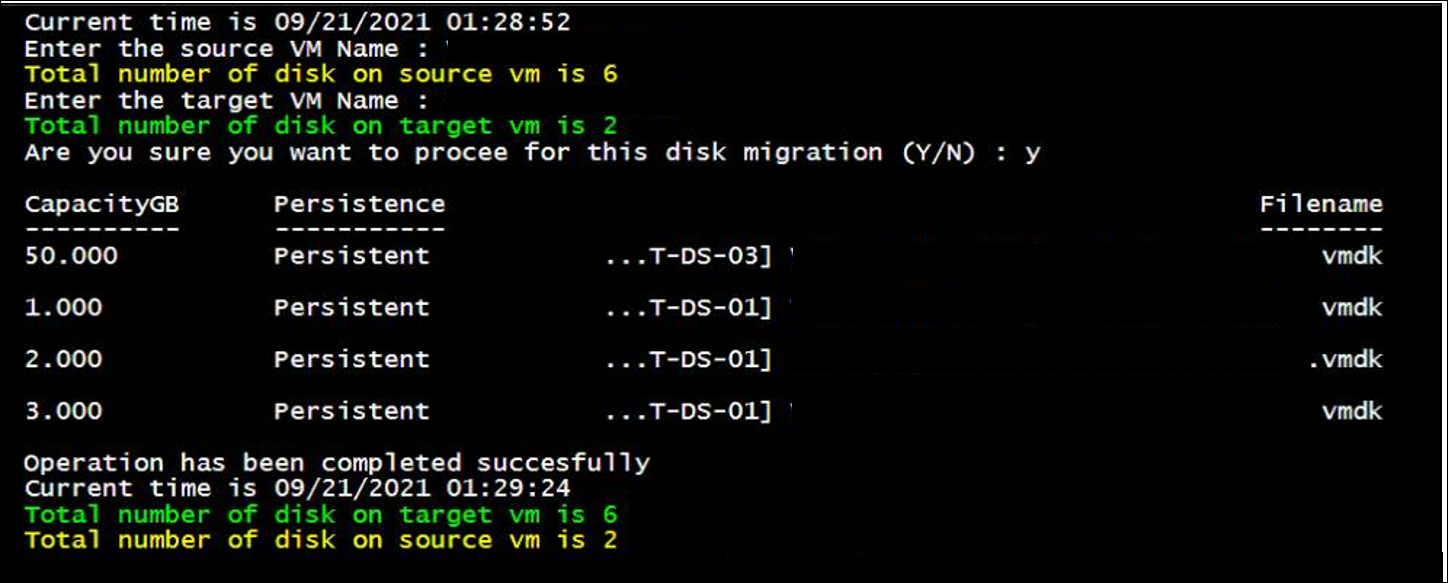
Below is the sample output

Note that time taken is just 32 seconds to move four VMDK files. Just to add, size of vmdk doesn't change the time for this migration.

Hope you will find it useful if you too have such requirement! Any doubt or thought, plesae feel free to comment.

Cheers!